Features
Everything you need to talk to anyone.
Text, talk, read aloud, share photos, jump on a video call and catch up on what you missed. PTT translates all of it, for every person in the chat, in the language they choose.
Multilingual chat
One thread. Everyone in their own language.
Write in yours and read in yours. PTT handles the middle part, instantly, for every person at once.
Group chat, translated
Everyone types or talks in the language they're comfortable with, and every message arrives in each reader's chosen language.
Talk and it types
Speak instead of typing. PTT turns your voice into text and translates it. Go hands-free and each sentence sends itself.
Tap and it talks
Have messages read aloud in your language, from 555 natural voices. Give each speaker their own voice and you'll know who's talking without looking.
Catch-up translation
Joined late? The whole conversation so far is translated for you. Save a transcript in your language when you're done.
Photos, files and pins
Share photos, PDFs, spreadsheets and even CAD drawings, plus GPS pins with map links, right in the thread.
Swap mode
Face to face with one device? Swap flips it between two languages so you can pass it across the counter and keep going.
Group chat, for real
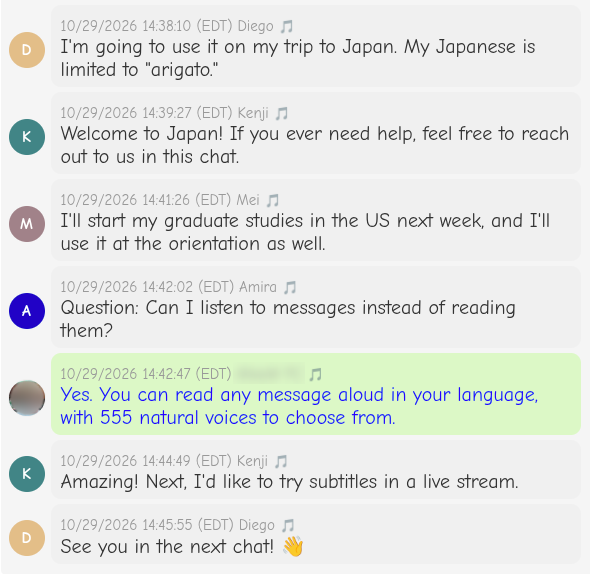
Not a mock-up. An actual thread.
The rest of our demo chat, on the host’s screen in English. Kenji wrote in Japanese, Mei in Chinese, Amira in Arabic and Diego in Spanish, and nobody had to switch languages to keep up.
What they actually typed
- Kenji · 日本語日本へようこそ!困ったら、このチャットで話しかけてくださいね。
- Amira · العربيةسؤال: هل يمكنني الاستماع إلى الرسائل بدلاً من قراءتها؟
- Kenji · 日本語すごい!次はライブ配信で字幕も試してみたいです。
Video calls
Face to face, still translated.
Go from typing to a video call without leaving the chat. Live translated captions run right over the video, so nobody needs to share a language to share a conversation.
- Start a call from any chat in a tap.
- Captions appear in each person's own language.
- Video calls are part of paid plans.
Hosting
You run the room.
Big group, small group or a crowd of strangers: you decide who talks, who shares and who just listens.
Permissions per person
Choose who can talk and who can share.
Listen-only arrivals
Keep new people listen-only until you let them speak. Handy for big public chats.
Saved groups
Save the people you invite often and start the next chat with all of them at once.
Links and QR codes
Share a chat by link or QR code: on a slide, a poster, a name badge or a front desk.
Public chats
Open a chat to anyone with the link. Visitors join with a free guest pass. Part of paid plans.
Transcripts
Everyone can save the conversation as a transcript in their own language.
No-friction access
Guests in seconds. Logins by code.
Nobody wants to create an account to ask where the bathroom is. With PTT they don't have to.
- Guests join public chats with a free guest pass. No sign-up needed.
- Members sign in with a one-time code and sign-in link instead of a password.
- Free accounts get their codes by email. Paid plans can get them by text in the US and Canada.
- Prefer a password? You can still use one.
More tools
There's more where that came from.
Live captions
Broadcast a class, talk or service and let every viewer read along in their own language.
Live captions →PTT Bridge
Stream hands-free from Mentra Live smart glasses, a phone or a webcam, fully translated.
PTT Bridge →FAQ
Feature questions, answered.
Which devices does PTT work on?
Phones, tablets, laptops and desktops with a modern browser. There's nothing to install for chat or live captions. Streaming from Mentra Live glasses uses the PTT Bridge app on the paired phone.
Can PTT read messages out loud?
Yes. Any message can be read aloud in your language, with 555 natural-sounding voices to choose from, and each speaker can have their own voice.
Does PTT translate voice messages?
PTT works with what you say, not recordings of it: talk and it turns your speech into text, translates it, and everyone else can read it or hear it in their own language.
What's free and what's paid?
Chatting with a free account is free, and guests join public chats for free. Video calls, public chats, live streaming and sign-in codes by text are part of paid plans. Pricing will be posted here soon.
How do people join my chat?
Share the chat link or let them scan its QR code. People with an account join right away; everyone else can take a free guest pass in a few seconds.
Can I save the conversation?
Yes. Save a transcript in your own language when you're done.
Try it on your next conversation.
Start a free chat and send the link to someone who speaks another language. It's more fun than it has any right to be.